

Hello Guys,
In this post, you know how to download and install Kurti dev in your computer, ms word and ms excel, etc.
Kurti dev is a Hindi Font. it used for Hindi typing Ex:- Hindi letter typing, Hindi application typing, and Other Hindi Data entering.
2. wait for coming download option
3. and select save path
For download, Kurti dev Click here
How to Install Kurti dev font in the computer, ms word, ms excel
1. Before you download of kurti dev font.
2. if you have downloaded of Kurti dev font.
3. Download after open the folder of kurti dev font.
4. Select all files ( Press CTRL + A )
5. Click the right button of the mouse.
6. And select the install button.

7. Wait to be installed


In this post, you know how to download and install Kurti dev in your computer, ms word and ms excel, etc.
Kurti dev is a Hindi Font. it used for Hindi typing Ex:- Hindi letter typing, Hindi application typing, and Other Hindi Data entering.
How to download Kurti dev font Free.
1. Click on link2. wait for coming download option
3. and select save path
For download, Kurti dev Click here
How to Install Kurti dev font in the computer, ms word, ms excel
1. Before you download of kurti dev font.
2. if you have downloaded of Kurti dev font.
3. Download after open the folder of kurti dev font.
4. Select all files ( Press CTRL + A )
5. Click the right button of the mouse.
6. And select the install button.

7. Wait to be installed

How to check Kurti dev font install in ms word and ms excel.
1. open the ms word, ms excel
2. Go to the home tab
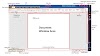
3. select the font option. and scroll down check Kurti dev font as shown in the photo.



 Font in MS word || Download Kurti dev font free )
0 Comments
If you have any doubts about the Programming language & Basic Computer. Please let me know.